In this tutorial, we’re gonna build a Spring Boot Rest CRUD API example that use Spring JdbcTemplate to interact with MySQL database. You’ll know:
- How to configure Spring Data JDBC to work with Database
- How to define Data Models and Repository interfaces
- Way to create Spring Rest Controller to process HTTP requests
- Way to use Spring JdbcTemplate to interact with MySQL Database
Exception Handling:
– Spring Boot @ControllerAdvice & @ExceptionHandler example
– @RestControllerAdvice example in Spring Boot
Unit Test: Spring Boot – Rest Controller Unit Test with @WebMvcTest
Documentation: Spring Boot Swagger 3 example
Caching: Spring Boot Redis Cache example
Validation: Validate Request Body in Spring Boot
Using Spring Data JPA instead:
Spring Boot, Spring Data JPA, MySQL example
Other Databases:
– Spring Boot JdbcTemplate example with H2
– Spring Boot JdbcTemplate example with PostgreSQL
Contents
Overview of Spring Boot JdbcTemplate and MySQL example
We will build a Spring Boot Rest API using Spring Data Jdbc with MySQL Database for a Tutorial application that:
- Each Tutorial has id, title, description, published status.
- Apis help to create, retrieve, update, delete Tutorials.
- Apis also support custom finder methods such as find by published status or by title.
These are APIs that we need to provide:
| Methods | Urls | Actions |
|---|---|---|
| POST | /api/tutorials | create new Tutorial |
| GET | /api/tutorials | retrieve all Tutorials |
| GET | /api/tutorials/:id | retrieve a Tutorial by :id |
| PUT | /api/tutorials/:id | update a Tutorial by :id |
| DELETE | /api/tutorials/:id | delete a Tutorial by :id |
| DELETE | /api/tutorials | delete all Tutorials |
| GET | /api/tutorials/published | find all published Tutorials |
| GET | /api/tutorials?title=[keyword] | find all Tutorials which title contains keyword |
– We make CRUD operations & finder methods with Spring Data Jdbc.
– The database will be MySQL by configuring project dependency & datasource.
This Spring Boot App works with Client in one of these posts:
- Simple HTTP Client using Axios
- Simple HTTP Client using Fetch API
- Angular 8 / Angular 10 / Angular 11 / Angular 12 / Angular 13 / Angular 14
- Vue 2 / Vue 3
- React / React Redux
Technology
- Java 8
- Spring Boot 2.5.5 (with Spring Web MVC, Spring Data JDBC)
- MySQL Database
- Maven 3.6.1
Project Structure
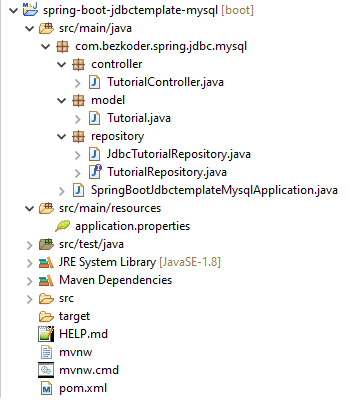
Let me explain it briefly.
– Tutorial data model class corresponds to entity and table tutorials.
– TutorialRepository is an interface that provides abstract methods for CRUD Operations and custom finder methods. It will be autowired in TutorialController.
– JdbcTutorialRepository implements TutorialRepository. It uses JdbcTemplate for executing SQL queries or updates to interact with Database.
– TutorialController is a RestController which has request mapping methods for RESTful requests such as: getAllTutorials, createTutorial, updateTutorial, deleteTutorial, findByPublished…
– Configuration for Spring Datasource, MySQL database in application.properties.
– pom.xml contains dependencies for Spring Boot Web, JDBC and MySQL Connector.
Create & Setup Spring Boot project
Use Spring web tool or your development tool (Spring Tool Suite, Eclipse, Intellij) to create a Spring Boot project.
Then open pom.xml and add these dependencies:
<dependency>
	<groupId>org.springframework.boot</groupId>
	<artifactId>spring-boot-starter-data-jdbc</artifactId>
</dependency>

<dependency>
	<groupId>org.springframework.boot</groupId>
	<artifactId>spring-boot-starter-web</artifactId>
</dependency>

<dependency>
	<groupId>mysql</groupId>
	<artifactId>mysql-connector-java</artifactId>
	<scope>runtime</scope>
</dependency>
Configure Spring Data and MySQL database
Under src/main/resources folder, open application.properties and write these lines.
spring.datasource.url= jdbc:mysql://localhost:3306/testdb?useSSL=false
spring.datasource.username= root
spring.datasource.password= 123456
spring.datasource.username & spring.datasource.password properties are the same as your database installation.
Define Data Model
Our Data model is Tutorial with four fields: id, title, description, published.
In model package, we define Tutorial class.
model/Tutorial.java
package com.bezkoder.spring.jdbc.mysql.model;

public class Tutorial {

  private long id;
  private String title;
  private String description;
  private boolean published;

  public Tutorial() {

  }

  public Tutorial(long id, String title, String description, boolean published) {
    this.id = id;
    this.title = title;
    this.description = description;
    this.published = published;
  }

  public Tutorial(String title, String description, boolean published) {
    this.title = title;
    this.description = description;
    this.published = published;
  }

  public void setId(long id) {
    this.id = id;
  }

  public long getId() {
    return id;
  }

  public String getTitle() {
    return title;
  }

  public void setTitle(String title) {
    this.title = title;
  }

  public String getDescription() {
    return description;
  }

  public void setDescription(String description) {
    this.description = description;
  }

  public boolean isPublished() {
    return published;
  }

  public void setPublished(boolean isPublished) {
    this.published = isPublished;
  }

  @Override
  public String toString() {
    return "Tutorial [id=" + id + ", title=" + title + ", desc=" + description + ", published=" + published + "]";
  }

}
Create JDBC Repository
Let’s create a repository to interact with Tutorials from the database.
In repository package, create TutorialRepository interface that provides abstract methods:
- for CRUD Operations:
save,findById,findAll,update,deleteById,deleteAll. - custom finder methods:
findByPublished,findByTitleContaining.
repository/TutorialRepository.java
package com.bezkoder.spring.jdbc.mysql.repository;

import java.util.List;

import com.bezkoder.spring.jdbc.mysql.model.Tutorial;

public interface TutorialRepository {
  int save(Tutorial book);

  int update(Tutorial book);

  Tutorial findById(Long id);

  int deleteById(Long id);

  List<Tutorial> findAll();

  List<Tutorial> findByPublished(boolean published);

  List<Tutorial> findByTitleContaining(String title);

  int deleteAll();
}
We continue to define JdbcTutorialRepository which implements TutorialRepository. It uses JdbcTemplate object for executing SQL queries or updates to interact with MySQL Database.
repository/JdbcTutorialRepository.java
package com.bezkoder.spring.jdbc.mysql.repository;

import java.util.List;

import org.springframework.beans.factory.annotation.Autowired;
import org.springframework.dao.IncorrectResultSizeDataAccessException;
import org.springframework.jdbc.core.BeanPropertyRowMapper;
import org.springframework.jdbc.core.JdbcTemplate;
import org.springframework.stereotype.Repository;

import com.bezkoder.spring.jdbc.mysql.model.Tutorial;

@Repository
public class JdbcTutorialRepository implements TutorialRepository {

  @Autowired
  private JdbcTemplate jdbcTemplate;

  @Override
  public int save(Tutorial tutorial) {
    return jdbcTemplate.update("INSERT INTO tutorials (title, description, published) VALUES(?,?,?)",
        new Object[] { tutorial.getTitle(), tutorial.getDescription(), tutorial.isPublished() });
  }

  @Override
  public int update(Tutorial tutorial) {
    return jdbcTemplate.update("UPDATE tutorials SET title=?, description=?, published=? WHERE id=?",
        new Object[] { tutorial.getTitle(), tutorial.getDescription(), tutorial.isPublished(), tutorial.getId() });
  }

  @Override
  public Tutorial findById(Long id) {
    try {
      Tutorial tutorial = jdbcTemplate.queryForObject("SELECT * FROM tutorials WHERE id=?",
          BeanPropertyRowMapper.newInstance(Tutorial.class), id);

      return tutorial;
    } catch (IncorrectResultSizeDataAccessException e) {
      return null;
    }
  }

  @Override
  public int deleteById(Long id) {
    return jdbcTemplate.update("DELETE FROM tutorials WHERE id=?", id);
  }

  @Override
  public List<Tutorial> findAll() {
    return jdbcTemplate.query("SELECT * from tutorials", BeanPropertyRowMapper.newInstance(Tutorial.class));
  }

  @Override
  public List<Tutorial> findByPublished(boolean published) {
    return jdbcTemplate.query("SELECT * from tutorials WHERE published=?",
        BeanPropertyRowMapper.newInstance(Tutorial.class), published);
  }

  @Override
  public List<Tutorial> findByTitleContaining(String title) {
    String q = "SELECT * from tutorials WHERE title LIKE '%" + title + "%'";

    return jdbcTemplate.query(q, BeanPropertyRowMapper.newInstance(Tutorial.class));
  }

  @Override
  public int deleteAll() {
    return jdbcTemplate.update("DELETE from tutorials");
  }
}
– JDBCTemplate implements JdbcOperations which provides useful methods: execute(), query(), update(), queryForObject()…
– BeanPropertyRowMapper implements RowMapper that converts a table row into a new instance of the specified mapped target class (Tutorial).
– Tutorial class must be a top-level class and have a default constructor (no-argument).
Create Spring Rest APIs Controller
Finally, we create a controller that provides APIs for creating, retrieving, updating, deleting and finding Tutorials.
controller/TutorialController.java
package com.bezkoder.spring.jdbc.mysql.controller;

import java.util.ArrayList;
import java.util.List;

import org.springframework.beans.factory.annotation.Autowired;
import org.springframework.http.HttpStatus;
import org.springframework.http.ResponseEntity;
import org.springframework.web.bind.annotation.CrossOrigin;
import org.springframework.web.bind.annotation.DeleteMapping;
import org.springframework.web.bind.annotation.GetMapping;
import org.springframework.web.bind.annotation.PathVariable;
import org.springframework.web.bind.annotation.PostMapping;
import org.springframework.web.bind.annotation.PutMapping;
import org.springframework.web.bind.annotation.RequestBody;
import org.springframework.web.bind.annotation.RequestMapping;
import org.springframework.web.bind.annotation.RequestParam;
import org.springframework.web.bind.annotation.RestController;

import com.bezkoder.spring.jdbc.mysql.model.Tutorial;
import com.bezkoder.spring.jdbc.mysql.repository.TutorialRepository;

@CrossOrigin(origins = "http://localhost:8081")
@RestController
@RequestMapping("/api")
public class TutorialController {

  @Autowired
  TutorialRepository tutorialRepository;

  @GetMapping("/tutorials")
  public ResponseEntity<List<Tutorial>> getAllTutorials(@RequestParam(required = false) String title) {
    try {
      List<Tutorial> tutorials = new ArrayList<Tutorial>();

      if (title == null)
        tutorialRepository.findAll().forEach(tutorials::add);
      else
        tutorialRepository.findByTitleContaining(title).forEach(tutorials::add);

      if (tutorials.isEmpty()) {
        return new ResponseEntity<>(HttpStatus.NO_CONTENT);
      }

      return new ResponseEntity<>(tutorials, HttpStatus.OK);
    } catch (Exception e) {
      return new ResponseEntity<>(null, HttpStatus.INTERNAL_SERVER_ERROR);
    }
  }

  @GetMapping("/tutorials/{id}")
  public ResponseEntity<Tutorial> getTutorialById(@PathVariable("id") long id) {
    Tutorial tutorial = tutorialRepository.findById(id);

    if (tutorial != null) {
      return new ResponseEntity<>(tutorial, HttpStatus.OK);
    } else {
      return new ResponseEntity<>(HttpStatus.NOT_FOUND);
    }
  }

  @PostMapping("/tutorials")
  public ResponseEntity<String> createTutorial(@RequestBody Tutorial tutorial) {
    try {
      tutorialRepository.save(new Tutorial(tutorial.getTitle(), tutorial.getDescription(), false));
      return new ResponseEntity<>("Tutorial was created successfully.", HttpStatus.CREATED);
    } catch (Exception e) {
      return new ResponseEntity<>(null, HttpStatus.INTERNAL_SERVER_ERROR);
    }
  }

  @PutMapping("/tutorials/{id}")
  public ResponseEntity<String> updateTutorial(@PathVariable("id") long id, @RequestBody Tutorial tutorial) {
    Tutorial _tutorial = tutorialRepository.findById(id);

    if (_tutorial != null) {
      _tutorial.setId(id);
      _tutorial.setTitle(tutorial.getTitle());
      _tutorial.setDescription(tutorial.getDescription());
      _tutorial.setPublished(tutorial.isPublished());

      tutorialRepository.update(_tutorial);
      return new ResponseEntity<>("Tutorial was updated successfully.", HttpStatus.OK);
    } else {
      return new ResponseEntity<>("Cannot find Tutorial with id=" + id, HttpStatus.NOT_FOUND);
    }
  }

  @DeleteMapping("/tutorials/{id}")
  public ResponseEntity<String> deleteTutorial(@PathVariable("id") long id) {
    try {
      int result = tutorialRepository.deleteById(id);
      if (result == 0) {
        return new ResponseEntity<>("Cannot find Tutorial with id=" + id, HttpStatus.OK);
      }
      return new ResponseEntity<>("Tutorial was deleted successfully.", HttpStatus.OK);
    } catch (Exception e) {
      return new ResponseEntity<>("Cannot delete tutorial.", HttpStatus.INTERNAL_SERVER_ERROR);
    }
  }

  @DeleteMapping("/tutorials")
  public ResponseEntity<String> deleteAllTutorials() {
    try {
      int numRows = tutorialRepository.deleteAll();
      return new ResponseEntity<>("Deleted " + numRows + " Tutorial(s) successfully.", HttpStatus.OK);
    } catch (Exception e) {
      return new ResponseEntity<>("Cannot delete tutorials.", HttpStatus.INTERNAL_SERVER_ERROR);
    }

  }

  @GetMapping("/tutorials/published")
  public ResponseEntity<List<Tutorial>> findByPublished() {
    try {
      List<Tutorial> tutorials = tutorialRepository.findByPublished(true);

      if (tutorials.isEmpty()) {
        return new ResponseEntity<>(HttpStatus.NO_CONTENT);
      }
      return new ResponseEntity<>(tutorials, HttpStatus.OK);
    } catch (Exception e) {
      return new ResponseEntity<>(HttpStatus.INTERNAL_SERVER_ERROR);
    }
  }

}
– @CrossOrigin is for configuring allowed origins.
– @RestController annotation is used to define a controller and to indicate that the return value of the methods should be be bound to the web response body.
– @RequestMapping("/api") declares that all Apis’ url in the controller will start with /api.
– We use @Autowired to inject TutorialRepository bean to local variable.
Run & Check
Run Spring Boot application with command: mvn spring-boot:run.
write SQL script to create tutorials table:
CREATE TABLE tutorials
(
    id BIGINT NOT NULL PRIMARY KEY AUTO_INCREMENT,
    title VARCHAR(255),
    description VARCHAR(255),
    published BOOLEAN
);
Create some Tutorials:
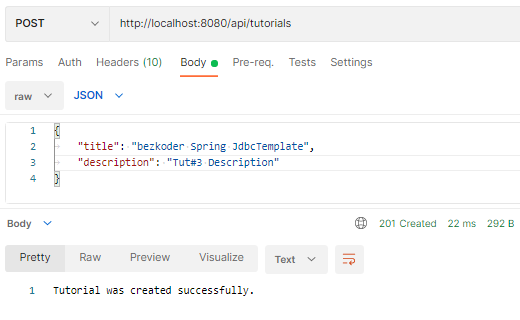
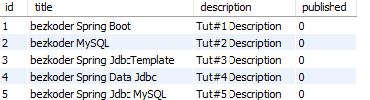
MySQL database tutorials table after that:
Update some Tutorials:

The table data is changed:

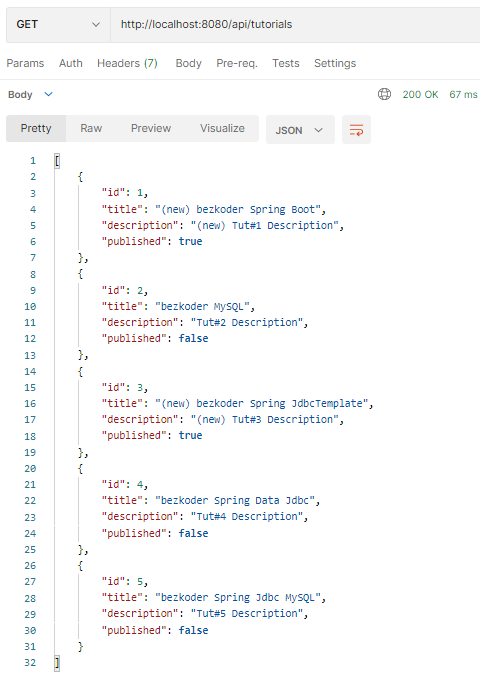
Retrieve all Tutorials:
Retrieve a Tutorial by Id:

Find all published Tutorials:
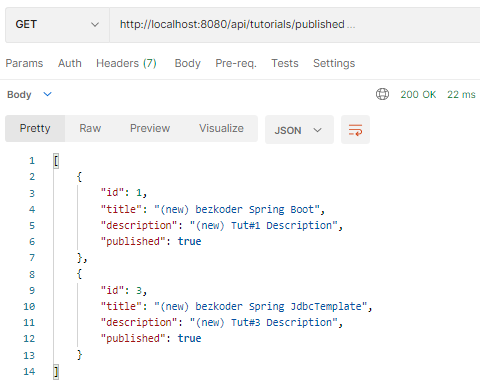
Find all Tutorials which title contains string ‘jdbc’:
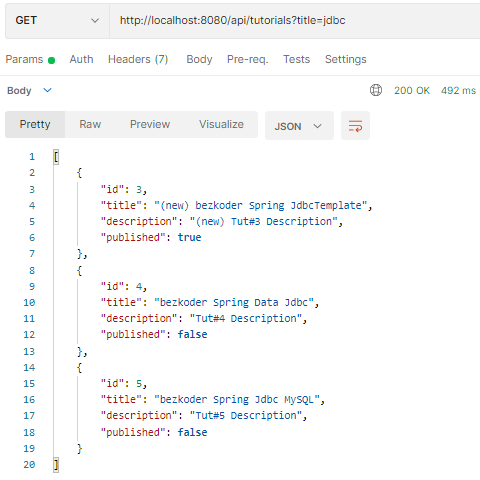
Delete a Tutorial:
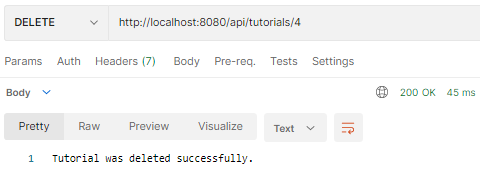
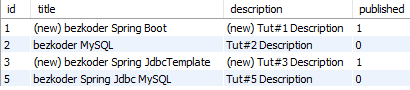
Delete all Tutorials:

Database table is clean now.
You can also test this Spring Boot App with Client in one of these posts:
- Simple HTTP Client using Axios
- Simple HTTP Client using Fetch API
- Angular 8 CRUD Application example with Web API
- Angular 10 CRUD Application example with Web API
- Angular 11 CRUD Application example with Web API
- Angular 12 CRUD Application example with Web API
- Angular 13 CRUD Application example with Web API
- Angular 14 CRUD Application example with Web API
- Angular 15 CRUD Application example with Web API
- Vue 2 CRUD Application with Vue Router & Axios
- Vue 3 CRUD Application with Axios & Vue Router
- React CRUD example to consume Web API
- React Redux CRUD example with API calls
Conclusion
Today we’ve built a CRUD Rest API using Spring Boot, Spring Data JDBCTemplate working with MySQL Database example.
You can handle Exception for this Rest APIs is necessary:
– Spring Boot @ControllerAdvice & @ExceptionHandler example
– @RestControllerAdvice example in Spring Boot
Or Unit Test:
Spring Boot – Rest Controller Unit Test with @WebMvcTest
Happy learning! See you again.
Further Reading
Fullstack CRUD App:
– Spring Boot + Vue.js
– Spring Boot + Angular 8
– Spring Boot + Angular 10
– Spring Boot + Angular 11
– Spring Boot + Angular 12
– Spring Boot + React
More Practice:
– Secure Spring Boot App with Spring Security & JWT Authentication
– Spring Boot Rest XML example – Web service with XML Response
– Spring Boot Multipart File upload example
– Spring Boot Pagination and Sorting example
Source Code
You can find the complete source code for this tutorial on Github.
You will also see that JpaRepository supports a great way to make CRUD operations and custom finder methods without need of boilerplate code. Kindly visit:
Spring Boot, Spring Data JPA, MySQL example
Other Databases:
– Spring Boot JdbcTemplate example with H2
– Spring Boot JdbcTemplate example with PostgreSQL
Documentation: Spring Boot + Swagger 3 example (with OpenAPI 3)
Caching: Spring Boot Redis Cache example
Validation: Validate Request Body in Spring Boot

Amazing coverage of content. Thanks for this wonderful tutorial.
Thanks for your time writing this tutorial!