In this tutorial, we’re gonna build a Spring Boot 3 Rest API example with Maven that implement CRUD operations. You’ll know:
- Way to define Spring Rest Controller
- Way to handle HTTP GET, POST, PUT, DELETE requests for CRUD Operations
- How to define Data Model and Service Component
Using databases:
– Spring Data JPA + H2
– Spring Data JPA + MySQL
– Spring Data JPA + PostgreSQL
– Spring Data JPA + SQL Server
– Spring Data + MongoDB
More Practice:
– Validate Request Body in Spring Boot
– Spring Boot WebFlux Rest API example
– Spring Boot @ControllerAdvice & @ExceptionHandler example
– @RestControllerAdvice example in Spring Boot
– Spring Boot Unit Test for Rest Controller
– Documentation: Spring Boot + Swagger 3 example (with OpenAPI 3)
– Caching: Spring Boot Redis Cache example
– Spring Boot + GraphQL example
Fullstack:
– Spring Boot Thymeleaf example
– Vue + Spring Boot example
– Angular 8 + Spring Boot example
– Angular 10 + Spring Boot example
– Angular 11 + Spring Boot example
– Angular 12 + Spring Boot example
– Angular 13 + Spring Boot example
– Angular 14 + Spring Boot example
– Angular 15 + Spring Boot example
– Angular 16 + Spring Boot example
– React + Spring Boot example
Contents
Overview of Spring Boot Rest API example
We will build a Spring Boot 3 Rest Api using Spring Web MVC for a Tutorial application in that:
- Each Tutorial has id, title, description, published status.
- Apis help to create, retrieve, update, delete Tutorials.
- Apis also support custom finder methods such as find by published status or by title.
These are APIs that we need to provide:
| Methods | Urls | Actions |
|---|---|---|
| POST | /api/tutorials | create new Tutorial |
| GET | /api/tutorials | retrieve all Tutorials |
| GET | /api/tutorials/:id | retrieve a Tutorial by :id |
| PUT | /api/tutorials/:id | update a Tutorial by :id |
| DELETE | /api/tutorials/:id | delete a Tutorial by :id |
| DELETE | /api/tutorials | delete all Tutorials |
| GET | /api/tutorials/published | find all published Tutorials |
| GET | /api/tutorials?title=[keyword] | find all Tutorials which title contains keyword |
Technology
- Java 17 / 11 / 8
- Spring Boot 3 (with Spring Web MVC)
- Maven
Project Structure
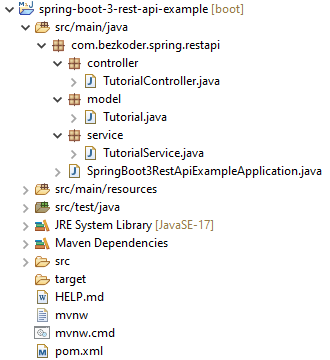
Let me explain it briefly.
– Tutorial data model class.
– TutorialService is a service component that implement CRUD methods and custom finder methods. It will be autowired in TutorialController.
– TutorialController is a RestController which has request mapping methods for RESTful requests such as: getAllTutorials, createTutorial, updateTutorial, deleteTutorial, findByPublished…
Create & Setup Spring Boot project
Use Spring web tool or your development tool (Spring Tool Suite, Eclipse, Intellij) to create a Spring Boot project.
Then open pom.xml and add these dependencies:
<dependency>
	<groupId>org.springframework.boot</groupId>
	<artifactId>spring-boot-starter-web</artifactId>
</dependency>
Define Data Model
Our Data model is Tutorial with four fields: id, title, description, published.
In model package, we define Tutorial class.
model/Tutorial.java
package com.bezkoder.spring.restapi.model;

public class Tutorial {
  private long id = 0;

  private String title;

  private String description;

  private boolean published;

  public Tutorial() {

  }

  public Tutorial(String title, String description, boolean published) {
    this.title = title;
    this.description = description;
    this.published = published;
  }

  public void setId(long id) {
    this.id = id;
  }

  public long getId() {
    return id;
  }

  public String getTitle() {
    return title;
  }

  public void setTitle(String title) {
    this.title = title;
  }

  public String getDescription() {
    return description;
  }

  public void setDescription(String description) {
    this.description = description;
  }

  public boolean isPublished() {
    return published;
  }

  public void setPublished(boolean isPublished) {
    this.published = isPublished;
  }

  @Override
  public String toString() {
    return "Tutorial [id=" + id + ", title=" + title + ", desc=" + description + ", published=" + published + "]";
  }

}
Create Data Service
Let’s create a service to implement CRUD Operations on the Tutorial model.
In service package, create TutorialService.
service/TutorialService.java
package com.bezkoder.spring.restapi.service;

import java.util.ArrayList;
import java.util.List;

import org.springframework.stereotype.Service;

import com.bezkoder.spring.restapi.model.Tutorial;

@Service
public class TutorialService {

  static List<Tutorial> tutorials = new ArrayList<Tutorial>();
  static long id = 0;

  public List<Tutorial> findAll() {
    return tutorials;
  }

  public List<Tutorial> findByTitleContaining(String title) {
    return tutorials.stream().filter(tutorial -> tutorial.getTitle().contains(title)).toList();
  }

  public Tutorial findById(long id) {
    return tutorials.stream().filter(tutorial -> id == tutorial.getId()).findAny().orElse(null);
  }

  public Tutorial save(Tutorial tutorial) {
    // update Tutorial
    if (tutorial.getId() != 0) {
      long _id = tutorial.getId();

      for (int idx = 0; idx < tutorials.size(); idx++)
        if (_id == tutorials.get(idx).getId()) {
          tutorials.set(idx, tutorial);
          break;
        }

      return tutorial;
    }

    // create new Tutorial
    tutorial.setId(++id);
    tutorials.add(tutorial);
    return tutorial;
  }

  public void deleteById(long id) {
    tutorials.removeIf(tutorial -> id == tutorial.getId());
  }

  public void deleteAll() {
    tutorials.removeAll(tutorials);
  }

  public List<Tutorial> findByPublished(boolean isPublished) {
    return tutorials.stream().filter(tutorial -> isPublished == tutorial.isPublished()).toList();
  }
}
Create Spring Rest APIs Controller
Finally, we create a controller that provides APIs for creating, retrieving, updating, deleting and finding Tutorials.
controller/TutorialController.java
package com.bezkoder.spring.restapi.controller;

import java.util.ArrayList;
import java.util.List;

import org.springframework.beans.factory.annotation.Autowired;
import org.springframework.http.HttpStatus;
import org.springframework.http.ResponseEntity;
import org.springframework.web.bind.annotation.CrossOrigin;
import org.springframework.web.bind.annotation.DeleteMapping;
import org.springframework.web.bind.annotation.GetMapping;
import org.springframework.web.bind.annotation.PathVariable;
import org.springframework.web.bind.annotation.PostMapping;
import org.springframework.web.bind.annotation.PutMapping;
import org.springframework.web.bind.annotation.RequestBody;
import org.springframework.web.bind.annotation.RequestMapping;
import org.springframework.web.bind.annotation.RequestParam;
import org.springframework.web.bind.annotation.RestController;

import com.bezkoder.spring.restapi.model.Tutorial;
import com.bezkoder.spring.restapi.service.TutorialService;

@CrossOrigin(origins = "http://localhost:8081")
@RestController
@RequestMapping("/api")
public class TutorialController {
  @Autowired
  TutorialService tutorialService;

  @GetMapping("/tutorials")
  public ResponseEntity<List<Tutorial>> getAllTutorials(@RequestParam(required = false) String title) {
    try {
      List<Tutorial> tutorials = new ArrayList<Tutorial>();

      if (title == null)
        tutorialService.findAll().forEach(tutorials::add);
      else
        tutorialService.findByTitleContaining(title).forEach(tutorials::add);

      if (tutorials.isEmpty()) {
        return new ResponseEntity<>(HttpStatus.NO_CONTENT);
      }

      return new ResponseEntity<>(tutorials, HttpStatus.OK);
    } catch (Exception e) {
      return new ResponseEntity<>(null, HttpStatus.INTERNAL_SERVER_ERROR);
    }
  }

  @GetMapping("/tutorials/{id}")
  public ResponseEntity<Tutorial> getTutorialById(@PathVariable("id") long id) {
    Tutorial tutorial = tutorialService.findById(id);

    if (tutorial != null) {
      return new ResponseEntity<>(tutorial, HttpStatus.OK);
    } else {
      return new ResponseEntity<>(HttpStatus.NOT_FOUND);
    }
  }

  @PostMapping("/tutorials")
  public ResponseEntity<Tutorial> createTutorial(@RequestBody Tutorial tutorial) {
    try {
      Tutorial _tutorial = tutorialService
          .save(new Tutorial(tutorial.getTitle(), tutorial.getDescription(), false));
      return new ResponseEntity<>(_tutorial, HttpStatus.CREATED);
    } catch (Exception e) {
      return new ResponseEntity<>(null, HttpStatus.INTERNAL_SERVER_ERROR);
    }
  }

  @PutMapping("/tutorials/{id}")
  public ResponseEntity<Tutorial> updateTutorial(@PathVariable("id") long id, @RequestBody Tutorial tutorial) {
    Tutorial _tutorial = tutorialService.findById(id);

    if (_tutorial != null) {
      _tutorial.setTitle(tutorial.getTitle());
      _tutorial.setDescription(tutorial.getDescription());
      _tutorial.setPublished(tutorial.isPublished());
      return new ResponseEntity<>( tutorialService.save(_tutorial), HttpStatus.OK);
    } else {
      return new ResponseEntity<>(HttpStatus.NOT_FOUND);
    }
  }

  @DeleteMapping("/tutorials/{id}")
  public ResponseEntity<HttpStatus> deleteTutorial(@PathVariable("id") long id) {
    try {
      tutorialService.deleteById(id);
      return new ResponseEntity<>(HttpStatus.NO_CONTENT);
    } catch (Exception e) {
      return new ResponseEntity<>(HttpStatus.INTERNAL_SERVER_ERROR);
    }
  }

  @DeleteMapping("/tutorials")
  public ResponseEntity<HttpStatus> deleteAllTutorials() {
    try {
      tutorialService.deleteAll();
      return new ResponseEntity<>(HttpStatus.NO_CONTENT);
    } catch (Exception e) {
      return new ResponseEntity<>(HttpStatus.INTERNAL_SERVER_ERROR);
    }

  }

  @GetMapping("/tutorials/published")
  public ResponseEntity<List<Tutorial>> findByPublished() {
    try {
      List<Tutorial> tutorials =  tutorialService.findByPublished(true);

      if (tutorials.isEmpty()) {
        return new ResponseEntity<>(HttpStatus.NO_CONTENT);
      }
      return new ResponseEntity<>(tutorials, HttpStatus.OK);
    } catch (Exception e) {
      return new ResponseEntity<>(HttpStatus.INTERNAL_SERVER_ERROR);
    }
  }
}
– @CrossOrigin is for configuring allowed origins.
– @RestController annotation is used to define a controller and to indicate that the return value of the methods should be be bound to the web response body.
– @RequestMapping("/api") declares that all Apis’ url in the controller will start with /api.
– We use @Autowired to inject TutorialService bean to local variable.
You can find way to write Unit test for this Controller at:
Spring Boot Unit Test for Rest Controller
More information: @RestController vs @Controller annotation
Run & Check
Run Spring Boot application with command: mvn spring-boot:run.
Create some Tutorials:
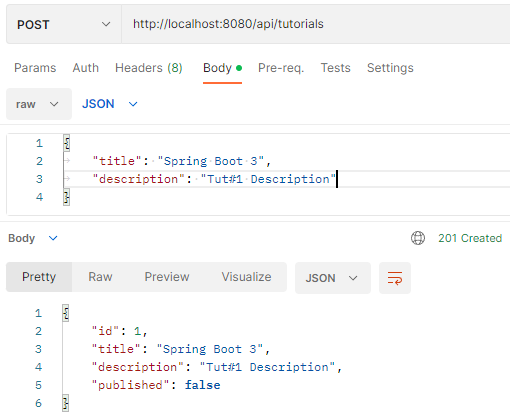
Retrieve all Tutorials:
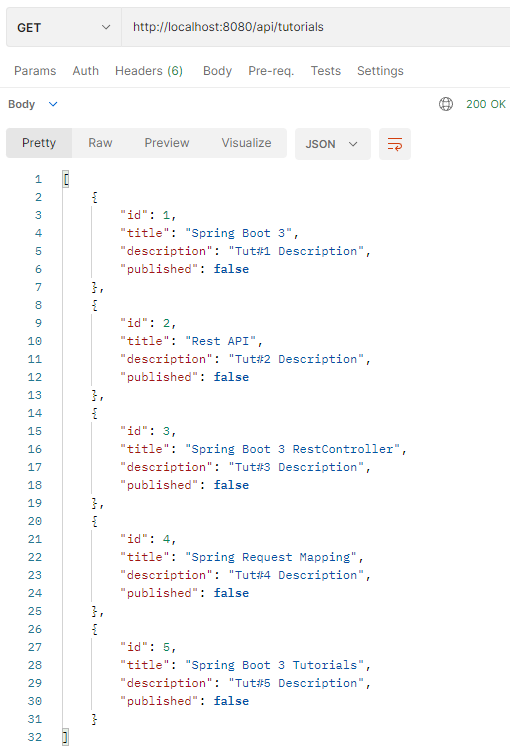
Update some Tutorials:
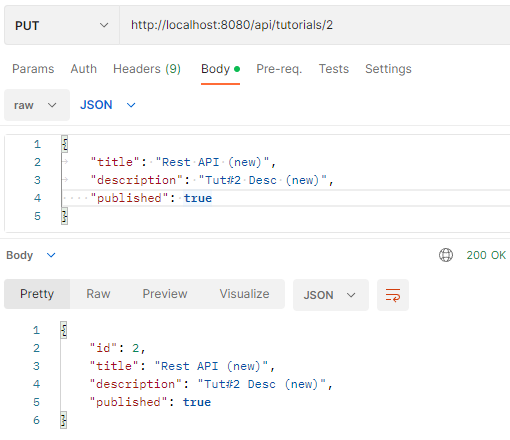
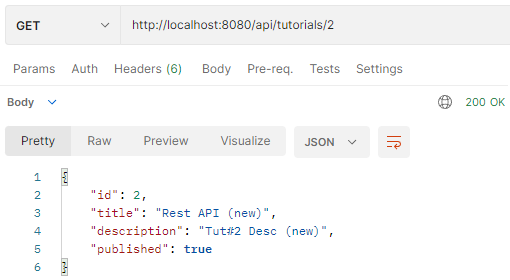
Retrieve a Tutorial by Id:
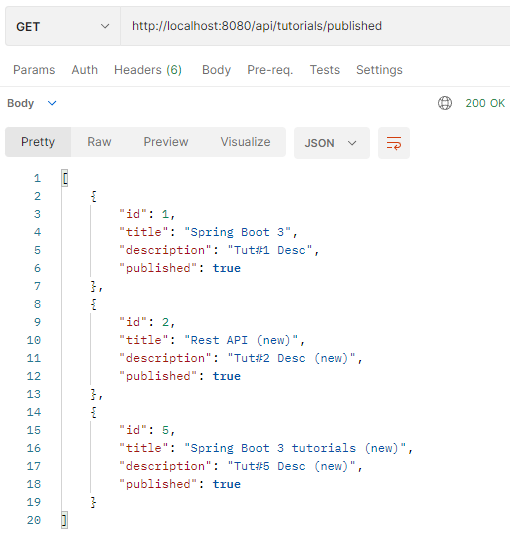
Find all published Tutorials:
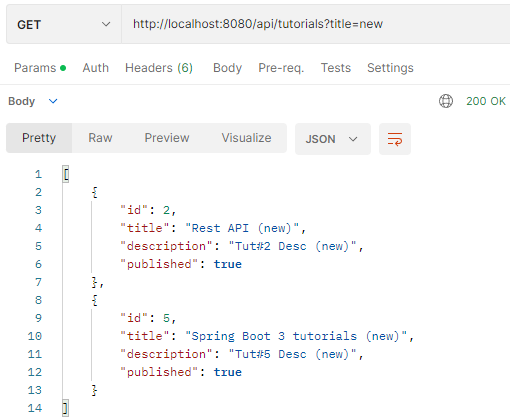
Find all Tutorials which title contains string ‘new’:
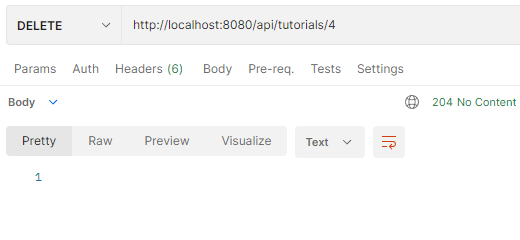
Delete a Tutorial:
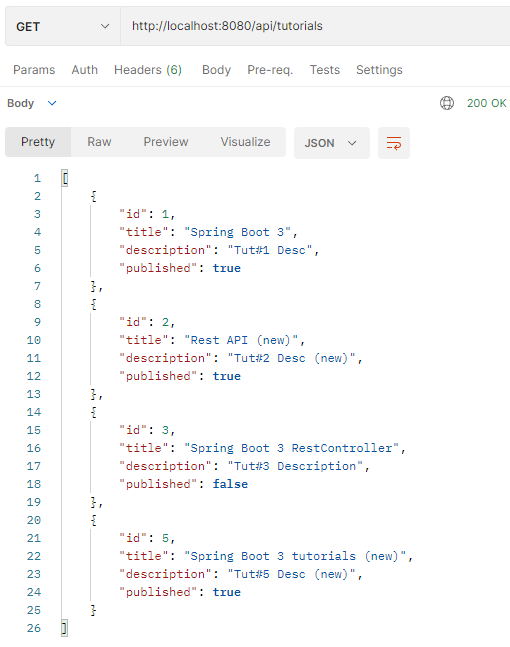
Check all current Tutorials:
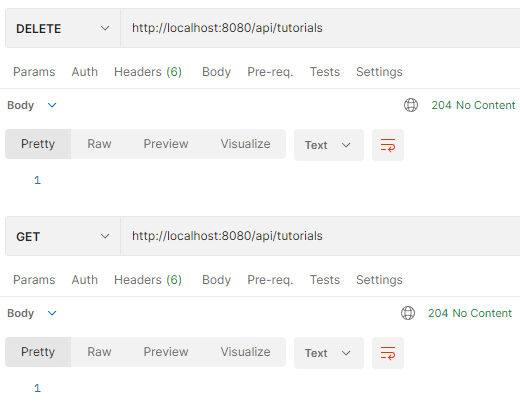
Delete all Tutorials and check:
You can also test this Spring Boot App with Client in one of these posts:
- Simple HTTP Client using Axios
- Simple HTTP Client using Fetch API
- Angular 8 CRUD Application example with Web API
- Angular 10 CRUD example with Web API
- Angular 11 CRUD example with Web API
- Angular 12 CRUD example with Web API
- Angular 13 CRUD example with Web API
- Angular 14 CRUD example with Web API
- Angular 15 CRUD example with Web API
- Angular 16 CRUD example with Web API
- Vue 2 CRUD example with Axios
- Vue 3 CRUD example with Axios
- React CRUD example with Axios
- React Redux CRUD example
Conclusion
Today we’ve built a Spring Boot 3 Rest API – CRUD example using Spring Web.
If you want to keep data after restarting the Application without using another complex database, you can use embedded database (H2):
Spring Boot JPA + H2 example: Build a CRUD Rest API
Happy learning! See you again.
Further Reading
Fullstack CRUD App:
– Spring Boot Thymeleaf example
– Vue + Spring Boot example
– Angular 8 + Spring Boot example
– Angular 10 + Spring Boot example
– Angular 11 + Spring Boot example
– Angular 12 + Spring Boot example
– Angular 13 + Spring Boot example
– Angular 14 + Spring Boot example
– Angular 15 + Spring Boot example
– Angular 16 + Spring Boot example
– React + Spring Boot example
More Practice:
– Validate Request Body in Spring Boot
– Spring Boot WebFlux Rest API example
– Secure Spring Boot with Spring Security & JWT Authentication
– Spring Boot Rest XML example – Web service with XML Response
– Spring Boot Multipart File upload example
– Spring Boot Pagination and Sorting example
We can improve the example by adding Comments for each Tutorial. It is the One-to-Many Relationship and I write a tutorial for this at:
Spring Boot One To Many example with JPA, Hibernate
Or add Tags with Many-to-Many Relationship:
Spring Boot Many to Many example with JPA, Hibernate
Source Code
You can find the complete source code for this tutorial on Github.
Using databases:
– Spring Data JPA + H2
– Spring Data JPA + MySQL
– Spring Data JPA + PostgreSQL
– Spring Data JPA + SQL Server
– Spring Data + MongoDB
Documentation: Spring Boot + Swagger 3 example (with OpenAPI 3)
Caching: Spring Boot Redis Cache example
Spring Boot + GraphQL example